Turn task paralysis into small steps you can actually start.
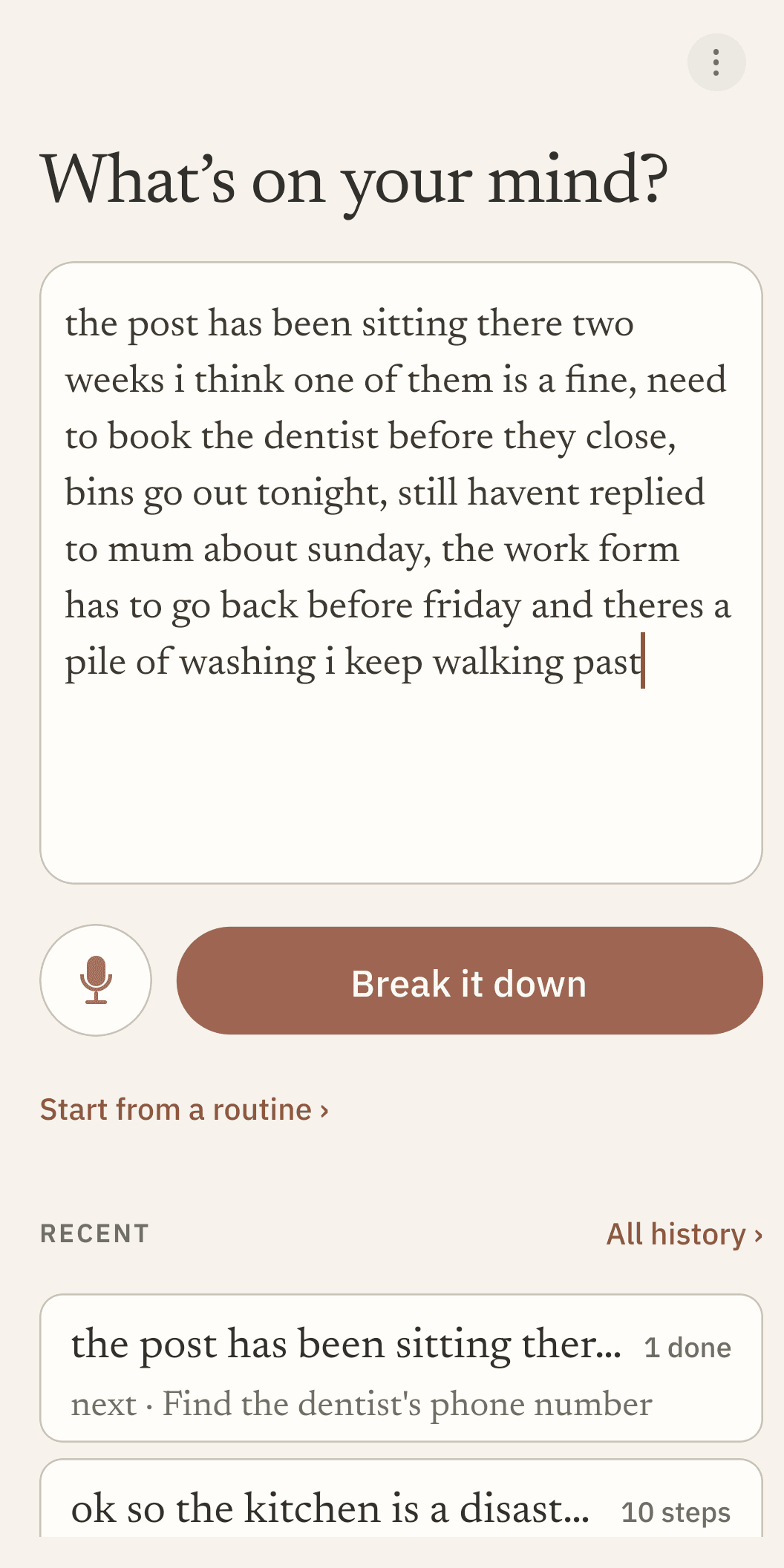
Type or speak whatever's spinning in your head, however messy. Chunkable breaks it into a short, editable checklist, so the next thing is always small enough to begin.
How does Chunkable actually work?
No setup, no manual. Here's what happens.
- Open the app and type or speak whatever's overwhelming you. No login, no quiz, nothing to set up first.
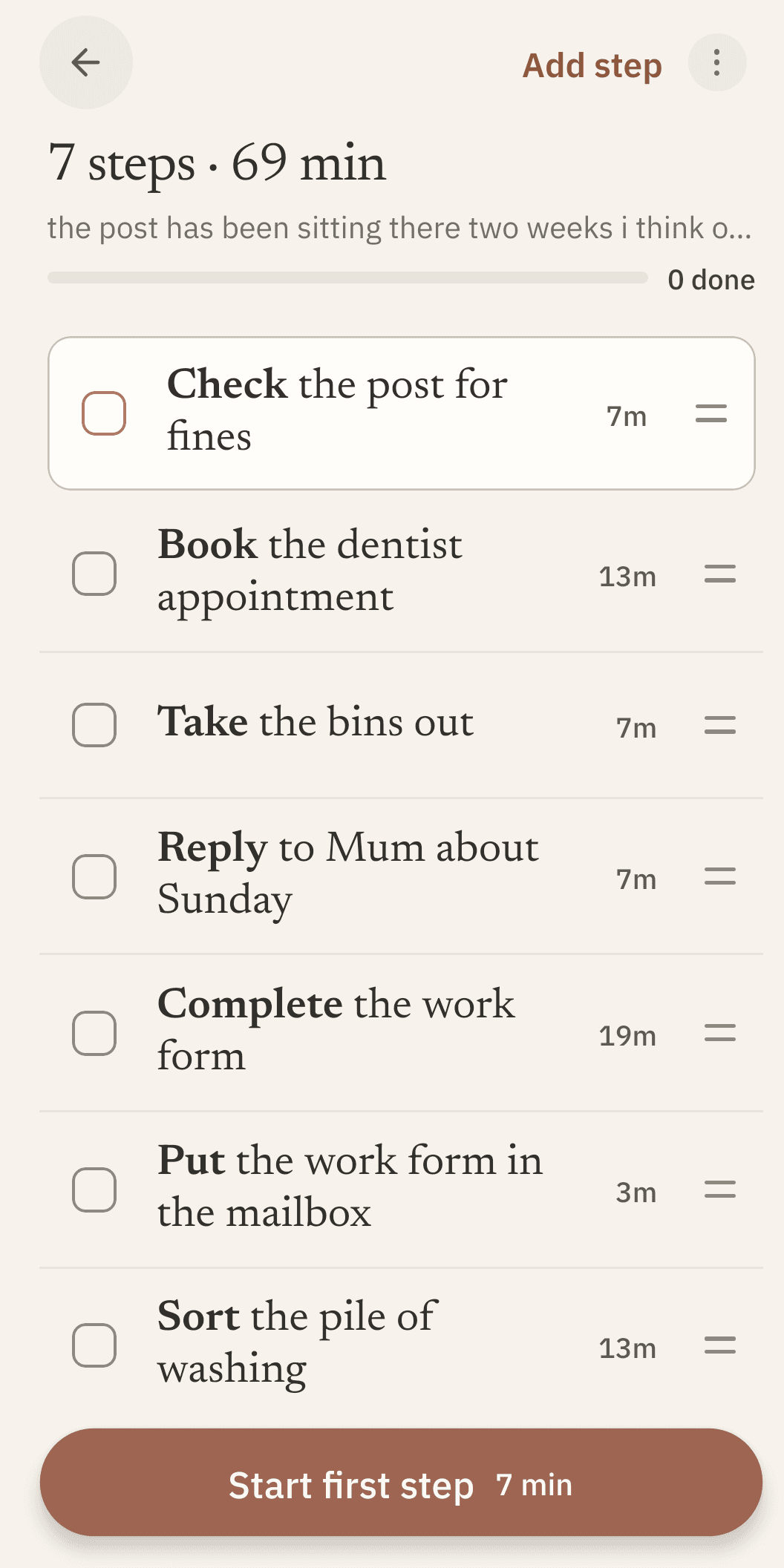
- Chunkable turns it into a short, editable checklist in seconds. Reorder or edit anything, nothing is ever locked.
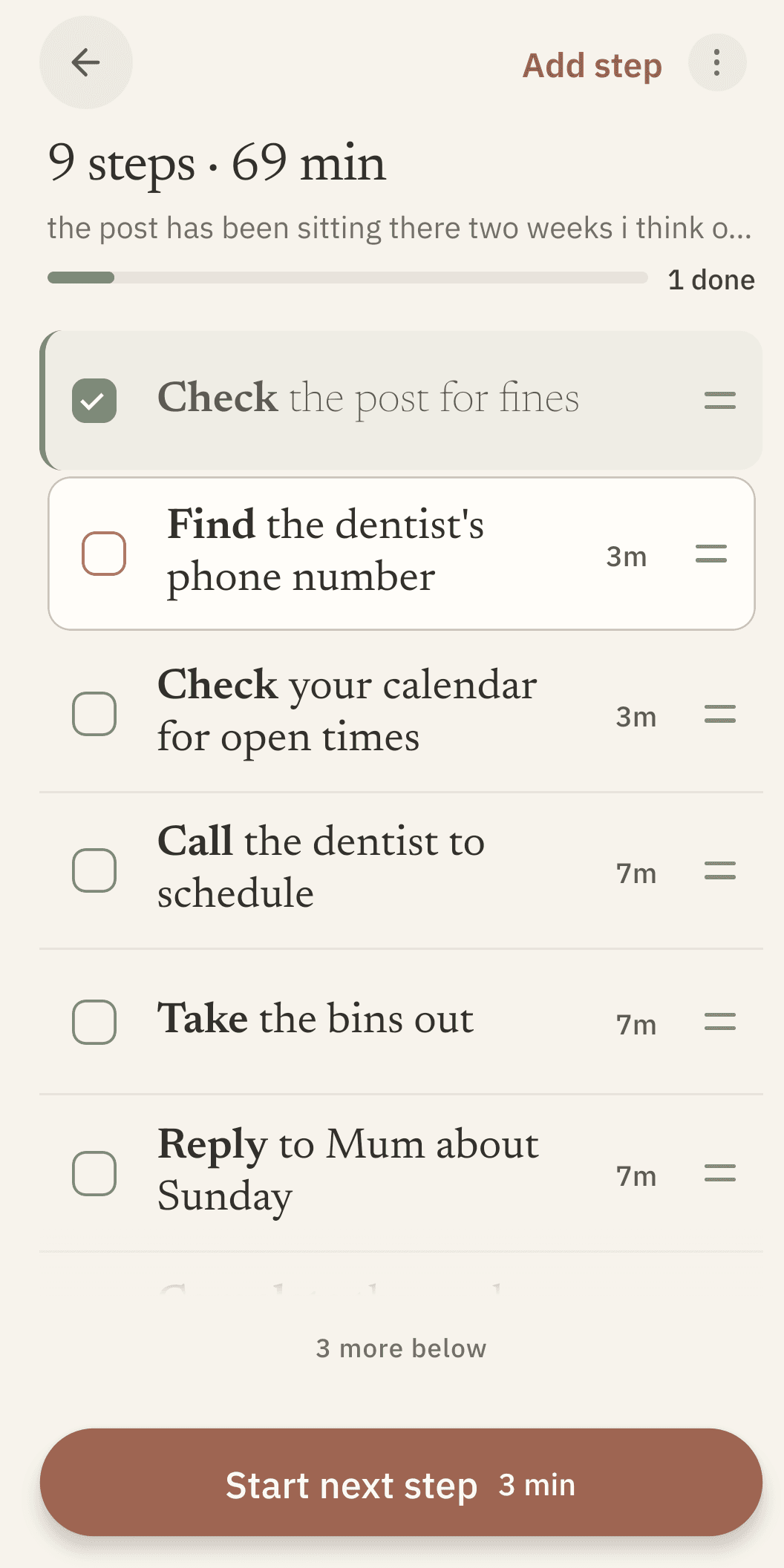
- Start a step and watch a live countdown while you work it, one step at a time, so the next few minutes have a shape.
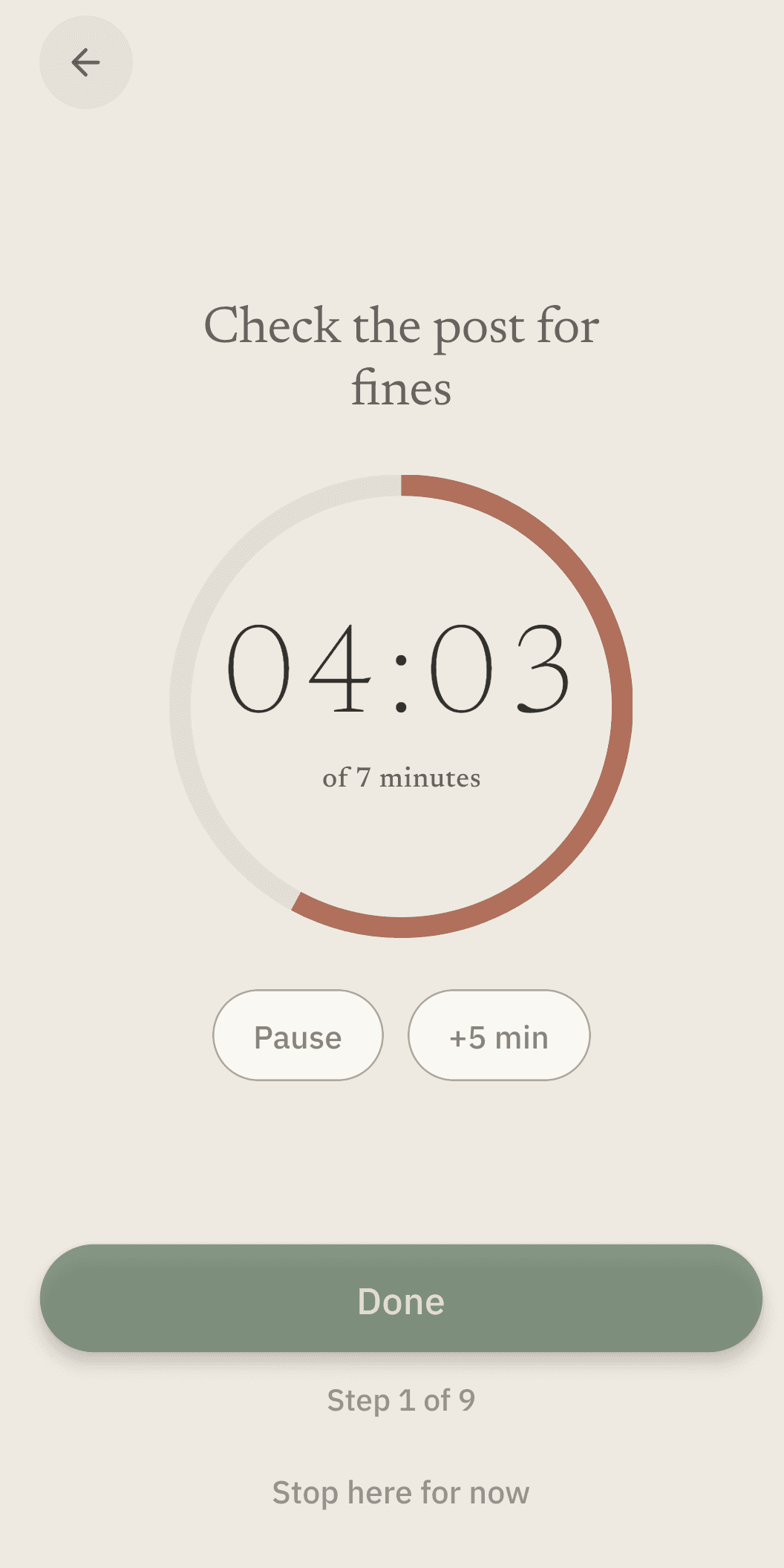
- Check it off. Quiet, positive feedback, no streak to protect, and nothing turns red if you stop partway.
What does Chunkable actually do?
A handful of real mechanics, not a feature list padded to look bigger than it is.
No character limit, no login, no quiz
A real brain dump becomes a real checklist
Type or speak whatever's spinning in your head, however messy. Chunkable turns it into a short, editable checklist. Nothing is ever locked or read-only, edit any step, anytime.
Visible right in your notification bar too
A live countdown while you work
Time stops disappearing on you. Start a step and watch it count down in real time, so the next few minutes have a shape instead of vanishing.
Drag to reorder
Drag any step somewhere else, and the new order actually saves, tested against force-close.
A live timer in your notification bar
The countdown keeps ticking there too, so you can check it without opening the app at all.
Three home-screen widgets
Your current step and time left, a quick-capture shortcut, and your list with working checkboxes. Each one resizes, and the current step keeps counting while a timer runs.
Routines
Save a breakdown you liked and reuse it later, without redoing the brain dump from scratch.
Voice input
Speak your brain dump instead of typing it, for as long as you need. It uses your phone's own dictation, the same one your keyboard uses, so there is no time limit and no audio ever reaches us.
A quiet buzz when you check something off
A small haptic tap, not a sound or a popup. Off in one switch if it is not for you.
Six themes
Paper & Clay, Fog, Dusk, Moss & Ochre, Carbon & Citron, and a High Contrast one. Pick any, or let Dusk take over automatically at night.
Custom AI instructions
Tell it once, "always add a warm-up step" or "keep language simple", and every breakdown remembers. Pro.
What do other ADHD apps get wrong?
This is built from reading thousands of real reviews across dozens of ADHD and task apps. A handful of complaints kept showing up, so we designed against them directly.
No quiz before you can start
Some apps put a personality quiz, a tutorial carousel, or an account wall between opening the app and doing anything. Chunkable's first screen is the brain dump box. Nothing else.
Reordering that actually saves
It's the single most common complaint across this whole app category: drag a step to reorder it, close the app, and the order is gone. Ours is tested against a force-close, every time.
No red badges, no broken streaks
Overdue counters and lost streaks train people to avoid the app on a bad day, exactly when they need it most. Nothing here ever turns red.
No surprise price changes
The strongest pattern in the research behind this app: task apps that pull a feature, or an entire lifetime tier, out from under people who already trusted it. If we ever change Pro's price, you get real notice before it applies to your subscription, and cancelling is always one tap in Google Play, no retention maze.
Chunkable isn't for everyone, and that's fine. It's Android-only for now: no iPhone or desktop app yet. And it's built for one task that feels too big to start, not for running a multi-week project with a team, deadlines, and shared lists, that's a different kind of tool entirely. If that's what you need, Chunkable probably isn't it. If what you need is help starting the next small thing, it is.
Curious why it's built this way, not just what it does?
Read the methodRead it in whatever's easiest to look at
The same checklist, in all six themes. Switch anytime in Settings.
Paper & Clay
Fog
Dusk
Moss & Ochre
High Contrast
Carbon & Citron
Keep the AI working for you.
Renews automatically until you cancel. No ads. Nothing you have already made ever gets locked, even if you don't subscribe.
Free, not a trial
- 20 AI breakdowns, once, no daily or monthly reset
- Every timer, and your full history
- Routines, and voice with no time limit
- All six themes
Checklists, timers, routines, and unlimited voice are free, with no trial clock. Custom AI instructions are Pro. Nothing you've already made will ever get locked.
Cancel any time in Google Play; you keep the AI until your current period ends.
Pro, monthly
- The AI, up to 50 breakdowns a day
- Tell it how you like your breakdowns
- Cancel any time, keep everything you made
Renews automatically until you cancel. No ads, and nothing you've already made ever gets locked.
Works out to $3.33/month, billed once a year: $43.89 less than paying monthly, every year you stay subscribed.
Pro, annual
- The AI, up to 50 breakdowns a day
- Tell it how you like your breakdowns
- Cancel any time, keep everything you made
Renews automatically until you cancel. No ads, and nothing you've already made ever gets locked.
Both Pro plans unlock the exact same thing: the AI allowance past the free amount, plus custom instructions for how you like your breakdowns written. Annual just costs less for the same thing, if you know you'll keep using it.
Questions
Does Chunkable diagnose or treat ADHD?
No. Chunkable is not a medical device and doesn't diagnose or treat ADHD. It's a tool for the specific, common experience of a task feeling too big to start.
Do I need an account?
No. There is no login, no email, no account of any kind. Open the app and start typing.
Is my data private?
Your brain dumps, steps and settings live on your device, not on a server of ours. A few things do travel: the text you ask the AI to break down or split goes to an AI provider, your voice goes to your phone's own speech service while you dictate, a record of the purchase goes to the payment services if you buy Pro, and your phone's own Google backup may copy your data into your own Google Drive if you have that switched on. None of those is us keeping a copy, and the privacy policy lists every one.
What happens if I miss a day?
Nothing. There is no streak to lose, no red warning, and no guilt messaging for what is left unchecked. Checking something off gives quiet, positive feedback: that is the whole feedback model.
Do I have to pay to use Chunkable?
No. Checklists, timers, routines, and unlimited voice are free, with no trial clock, plus 20 AI breakdowns to start with. Pro ($6.99/month or $39.99/year) just keeps the AI going past that and adds custom AI instructions. Cancel any time, and nothing you've already made ever gets locked either way.
What if I need help?
Email chunkableapp@gmail.com. It is a small project, so you are writing to a person, not a queue.
The next thing to do doesn't have to feel this big.
Free to start. Your list doesn't disappear when you check a box.